How to Create a Social Media Content Calendar
If you want to succeed on social media, consistency is key. But keeping up with daily posts, trends, and engagement can feel overwhelming without a plan. That’s where a social media content calendar comes in.
A content calendar helps you organize, schedule, and track all your posts across platforms—making your strategy more efficient and effective.
Here’s a step-by-step guide to creating one in 2025.
🔹 Step 1: Define Your Goals
Before creating a calendar, decide what you want to achieve with social media.
- Do you want brand awareness?
- More engagement?
- Generate leads and sales?
- Build a community?
Clear goals will guide what kind of content you should create.
🔹 Step 2: Identify Your Audience
Knowing your audience helps you craft content that resonates. Consider:
- Age, location, interests, and profession
- Which platforms they use (Instagram, LinkedIn, TikTok, etc.)
- What type of content they prefer (videos, carousels, memes, blogs)
🔹 Step 3: Choose the Right Platforms
You don’t need to be everywhere—focus on platforms that align with your goals and audience. For example:
- Instagram & TikTok → Great for visual storytelling and trends.
- LinkedIn → Best for B2B networking and professional content.
- Facebook → Strong for communities and ads.
- X (Twitter) → Best for real-time updates and conversations.
🔹 Step 4: Plan Content Types
Mix up your content so it doesn’t feel repetitive. Popular content types for 2025 include:
- Educational Posts → Tips, tutorials, how-tos.
- Engagement Posts → Polls, quizzes, questions.
- Behind-the-Scenes → Show your team, office, or process.
- User-Generated Content (UGC) → Customer photos, testimonials.
- Trends & Reels → Short-form videos with trending sounds.
- Promotional Posts → New launches, offers, services.
🔹 Step 5: Create a Posting Schedule
Decide how often you’ll post. Example:
- Instagram → 4–5 posts/week + daily stories
- LinkedIn → 3 posts/week
- TikTok → 3–5 short videos/week
- Facebook → 2–3 posts/week
Use tools like Buffer, Hootsuite, or Notion to organize and automate posting.
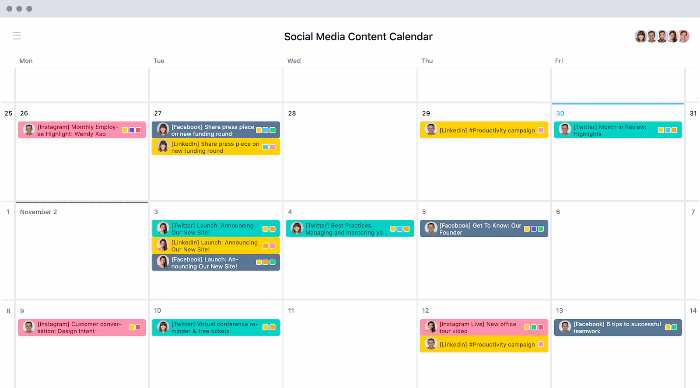
🔹 Step 6: Build Your Content Calendar
Your calendar should include:
- Date & Time of post
- Platform (Instagram, LinkedIn, etc.)
- Content Type (video, carousel, blog link, story)
- Caption/Hashtags
- Goal/Purpose (awareness, engagement, sales)
- Responsible Person (designer, writer, marketer)
📌 Pro Tip: Use Google Sheets, Trello, or tools like Later and ContentStudio for easy tracking.
🔹 Step 7: Track & Adjust
A content calendar isn’t just about posting—it’s also about analyzing results.
Monitor metrics like:
- Engagement rate
- Reach and impressions
- Click-throughs
- Conversions